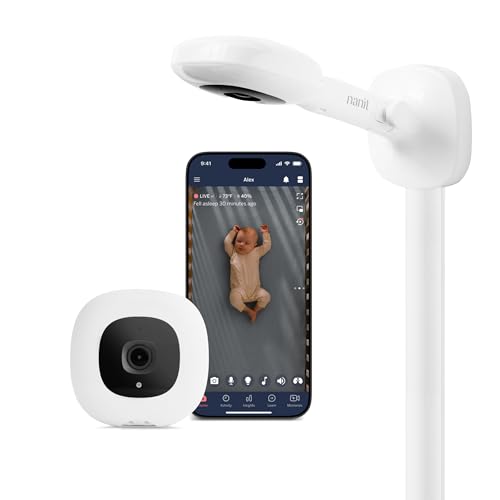
Quick take: You can start using a baby monitor as early as the third trimester, but buying it a few weeks before your due date gives you time to set it up and get comfortable. Look for a monitor with strong range, reliable battery life, night‑vision video (if you want visual reassurance), and a low‑EMF design. Budget‑friendly models can meet safety standards, and most reputable brands offer a 30‑day return window.
It’s 2 a.m., and you’re scrolling through a sea of baby‑monitor ads, wondering whether the little device will actually calm the flutter of anxiety that comes with every kick. You’re not alone—many expectant parents wonder when the right moment is to bring a monitor into the nursery planning process. The short answer? Most experts suggest buying and testing a monitor in the third trimester, before the baby’s first cries fill the room.
In this guide we’ll walk through exactly when to buy a baby monitor during pregnancy, what safety considerations to keep in mind, which features matter most before birth, and how to set up the device so it feels like a seamless part of your newborn routine. We’ll also compare audio‑only and video options, explore budget‑friendly picks, and give you a checklist for warranties, returns, and peace of mind.
Whether you’re a first‑time parent or adding another little one to the family, the information below is designed to help you make a confident, evidence‑based decision without the overwhelm.

When should I start using a baby monitor during pregnancy?
Most clinicians agree that the primary benefit of a monitor is to listen for a newborn’s sounds, not a fetus’s movements. However, using a monitor in the third trimester can still provide peace of hand—especially if you have a high‑risk pregnancy or tend to worry about nighttime kicks.
Why the third trimester feels right
By week 28 most babies have developed a regular sleep‑wake pattern, and the womb’s acoustic environment begins to resemble the world outside. A monitor can help you become familiar with your baby’s baseline cry, which can reduce anxiety once they’re born.
What the American Academy of Pediatrics says
The AAP’s guidance on infant sleep safety does not require a monitor before birth, but it does state that a monitor can be useful for “parents who are concerned about nighttime infant health.” The key is to use the device responsibly and avoid over‑monitoring, which can increase parental stress.
Practical tip
Set a reminder to test the monitor a week before your estimated due date. Place it in the room where the crib will sit, turn it on, and listen for any background noise. If the sound is clear and the range feels adequate, you’re ready.
Best time to buy a baby monitor in the third trimester
Timing your purchase is a balance between having enough lead‑time to learn the device and not buying too far ahead, which can lead to outdated technology by the time the baby arrives.
How far in advance should you purchase?
Experts from the National Institute of Child Health and Human Development (NICHD) suggest buying a monitor **4–6 weeks before your due date**. This window gives you time for shipping, registration, and a trial run, while still keeping the technology current.
Why waiting until the last weeks can be risky
If you wait until the final week of pregnancy, you may encounter shipping delays or unexpected return‑policy issues that leave you without a monitor when you need it most.
Seasonal considerations
Many brands release new models in the spring and fall. If you’re buying in the third trimester during a peak season, check for “last‑year” discounts that can stretch your budget without sacrificing safety features.
What features to look for in a baby monitor before birth
Choosing a monitor is a bit like picking a car: you want safety, reliability, and a few comforts that make the ride smoother. Below are the core features that matter most for pregnant users.
Range and signal strength
For a typical single‑story home, a monitor with a **300‑foot range** (about 90 meters) is sufficient. If you have a multi‑level house, aim for **500 feet** or a model that uses Wi‑Fi for broader coverage.
Battery life expectations for the first months
Most modern monitors boast **10–12 hours** of continuous use on a single charge, which translates to a few days of standby time. Look for models with a **replaceable battery** or a **charging dock** that can be left plugged in overnight.
Night vision and audio clarity
Video monitors with infrared night vision let you see your baby without a bright light. Check that the camera’s resolution is at least **720p** for clear images. For audio‑only units, a **frequency response of 300–3400 Hz** ensures you’ll hear the subtle nuances of a newborn’s cry.
Two‑way talk and lullaby functions
Two‑way talk lets you soothe your baby from another room, which can be especially helpful if you’re on the maternity ward after delivery. Some monitors also include pre‑loaded lullabies or white‑noise tracks that can aid sleep.
Smart features and cry detection
Modern “smart” monitors use AI to differentiate between a baby’s cry and other household noises. According to a 2023 review by the Academy of Nutrition and Dietetics, cry‑detection accuracy varies between **80 %–95 %**. If this feature is a priority, verify the manufacturer’s claim with independent testing.
EMF and radiation safety
All electronic devices emit some electromagnetic fields (EMF). The FDA and FCC have set exposure limits well below thresholds associated with health effects. Choose a monitor that complies with **FCC Part 15** and offers a **low‑EMF mode** or can be kept at a distance of at least **30 cm** from the mother’s abdomen while pregnant.
Compatibility with smartphones and smart‑home ecosystems
Most monitors now pair with iOS and Android apps. If you already use a smart‑home hub (e.g., Amazon Alexa, Google Home), look for a model that integrates seamlessly, allowing you to check on your baby via voice commands.
Budget‑friendly baby monitors for expectant parents
Cost is a real concern, especially when you’re already budgeting for diapers, a crib, and a car seat. The good news is that safety‑approved monitors exist across a wide price range.
What you get for $50‑$100
In this bracket you’ll find reliable audio‑only units and basic video monitors. Brands like **VTech** and **Infant Optics** offer models with a **300‑foot range**, clear sound, and a simple LCD screen. While they may lack AI cry detection, they still meet the AAP’s safety standards.
Mid‑range $100‑$200 options
For a bit more, you can access video monitors with **720p HD**, night‑vision, and two‑way talk. Popular choices include the **Nanit Plus** and **Motorola Halo+**, which also provide sleep‑tracking analytics and smartphone integration.
Premium $200+ models
High‑end monitors combine video, AI cry detection, temperature/humidity sensors, and even air‑quality monitoring. The **Miku Smart Baby Monitor** and **Arlo Baby** fall into this tier, offering a suite of smart home features and premium build quality.
Cost‑benefit analysis
If your primary goal is to hear your newborn’s cry and feel reassured, a $70 audio‑only unit will suffice. If you value video, data insights, and integration with other devices, a $150‑$250 model offers a good balance of features and price.
Wireless vs wired baby monitors for newborn safety
When it comes to safety, the biggest distinction isn’t about the monitor’s power source but about **electromagnetic exposure** and **reliability**.
Wireless (battery‑powered) monitors
These are the most common and convenient. They typically use **2.4 GHz radio frequency** or **Wi‑Fi**. As long as they meet FCC Part 15 standards, the EMF exposure is far below the limits set by the International Commission on Non‑Ionizing Radiation Protection (ICNIRP).
Wired (plug‑in) monitors
Wired units remain plugged into a wall outlet, which eliminates battery‑related downtime. Some parents prefer them for the perceived “no‑radiation” benefit, but a plugged‑in device still emits EMF, just at a different frequency.
Which is safer for a newborn?
Both types are safe when used according to manufacturer instructions. The key is to keep the monitor **at least 30 cm** away from the baby’s crib and to avoid placing the transmitter directly on the mother’s abdomen.
Practical recommendation
If you’re concerned about EMF, choose a monitor with a **low‑EMF mode** or a **DECT** (Digital Enhanced Cordless Telecommunications) frequency, which operates at **1.9 GHz** and is considered lower‑risk by many health agencies.
Top rated baby monitors for newborns 2024
Below is a snapshot of the most highly rated monitors according to the Consumer Reports 2024 guide and the American Academy of Pediatrics.
All of these models meet the AAP’s safety criteria, have a **30‑day return policy**, and are compatible with both iOS and Android devices.
How to set up a baby monitor before baby arrives
Setting up early lets you troubleshoot any hiccups while you’re still relaxed, not sleep‑deprived.
Step‑by‑step setup guide
- Unbox and charge. Plug the parent unit into a wall outlet for at least two hours before first use.
- Register the device. Create an account on the manufacturer’s website or app. This step often unlocks firmware updates.
- Choose a location. Place the camera on a nightstand or shelf at about **3‑4 feet** from the crib. Ensure the line‑of‑sight is clear.
- Connect to Wi‑Fi. Follow the app’s prompts; use a 2.4 GHz network for best compatibility.
- Test the range. Walk around your home with the parent unit, checking for signal drops. If you notice interruptions, reposition the camera or add a Wi‑Fi extender.
- Adjust settings. Enable night‑vision, set volume levels, and turn on any AI cry‑detection alerts. Most apps let you set “quiet hours” to avoid nighttime false alarms.
- Practice two‑way talk. Speak into the parent unit and listen for your voice through the monitor’s speaker. This will be useful if you need to soothe the baby from another room.
- Secure the device. Change the default password to a strong, unique one. Enable two‑factor authentication if offered.
App integration tips
Many monitors sync with health‑tracking apps that log sleep patterns. If you already use a pregnancy tracking app, see if it can import the monitor’s data—some platforms allow you to view both infant sleep and maternal wellness side by side.
Baby monitor safety guidelines for pregnant women
Safety concerns often surface when you first hear the term “baby monitor.” Below are evidence‑based guidelines to keep both you and your future baby safe.
EMF exposure limits
The FDA states that the radiofrequency (RF) exposure from consumer devices is far below the Specific Absorption Rate (SAR)** limit of 1.6 W/kg** for the general public. A monitor that complies with FCC Part 15 is considered safe for use during pregnancy.
Placement recommendations
- Keep the transmitter **at least 30 cm (12 inches) away** from your abdomen while you’re still pregnant.
- Place the camera **outside the immediate sleeping area**—for example, on a nightstand rather than attached to the crib.
- Avoid mounting the monitor directly on a metal surface that could amplify the signal.
When to turn off the monitor
If you experience heightened anxiety or notice the monitor’s alerts causing stress, it’s okay to turn it off for a few hours. Your mental health is as important as the technical safety of the device.
Trusted sources
The CDC’s “Radiation Protection” page and the WHO’s “Electromagnetic Fields and Public Health” fact sheet both affirm that everyday consumer devices, including baby monitors, do not pose a measurable health risk when used as intended.
Baby monitor warranty and return policy tips
Even the best‑reviewed monitor can have a defective unit. Knowing how to navigate warranties saves you time and money.
Typical warranty length
Most reputable brands offer a **one‑year limited warranty** covering defects in materials and workmanship. Some premium models extend to **two years**.
Return‑policy best practices
- Buy from a retailer with a **30‑day return window** and free shipping on returns.
- Keep the original packaging, manuals, and accessories—retailers often require them for a full refund.
- Test the monitor within the first week; if you notice connectivity issues, contact customer support promptly.
Customer‑support considerations
Look for brands that provide **live chat**, a **dedicated phone line**, and an **online knowledge base**. Quick response times can be crucial if you encounter setup problems after the baby arrives.
Extended protection plans
Some stores sell extended warranties that cover accidental damage. Evaluate the cost versus the likelihood of physical damage—many parents find the standard warranty sufficient.
Myth vs. fact
Myth: Baby monitors emit dangerous radiation that can harm a developing fetus.
Fact: All monitors sold in the U.S. and U.K. meet FCC and CE electromagnetic‑field standards. The emitted radiation is far below levels shown to cause any biological effect.
Myth: You need a monitor the moment you feel the first kick.
Fact: The primary purpose of a monitor is to hear a newborn’s cry. Using one in the first two trimesters offers little practical benefit and may increase anxiety.
Myth: More expensive monitors guarantee better safety.
Fact: Safety is governed by compliance with regulatory standards, not price. A well‑reviewed $80 audio unit can be just as safe as a $300 video model.
Key takeaways
- Buy a monitor **4–6 weeks before your due date** to allow setup and testing.
- Choose a model with a **300‑foot (or greater) range**, reliable battery life, and low‑EMF compliance.
- Audio‑only monitors are budget‑friendly; video monitors add visual reassurance and smart features.
- Both wireless and wired monitors meet safety standards when placed away from the crib and mother’s abdomen.
- Test the device early, register it, and secure the app with a strong password.
- Check the warranty length and return policy before purchasing; a 30‑day window is ideal.
Frequently asked questions
When is the right time to start using a baby monitor?
The consensus among pediatric experts is to begin using a monitor **once the baby is born**. If you’re in the third trimester and want extra reassurance, you can test the device a few weeks before delivery, but its primary function is for newborn monitoring.
Do baby monitors emit harmful radiation for pregnant women?
Modern monitors comply with FCC Part 15 and CE standards, keeping electromagnetic‑field exposure well under the limits set by the FDA and WHO. Using the monitor at least 30 cm away from your abdomen eliminates any theoretical risk.
Can I set up a baby monitor before my baby is born?
Yes. Setting it up early gives you time to troubleshoot connectivity, adjust camera angles, and become comfortable with the app. Follow the step‑by‑step guide above, and remember to keep the transmitter away from your belly.
What is the difference between audio and video baby monitors?
Audio monitors transmit sound only, while video monitors add a live video feed, night‑vision capability, and often smart features like cry detection. Audio units are cheaper and have longer battery life; video units provide visual reassurance but may require a stronger Wi‑Fi connection.
How far can a baby monitor signal reach in a typical home?
Most monitors advertise a **300‑foot (≈90 m) range** for a single‑story house. Multi‑story homes may see reduced range due to walls and floors; using a Wi‑Fi‑based monitor or a range extender can improve coverage.
Are there any safety concerns with using a baby monitor during pregnancy?
Safety concerns focus on EMF exposure and placement. Keep the monitor at least 30 cm from the abdomen, ensure it meets FCC/CE standards, and avoid placing the transmitter directly on the mother’s belly. Otherwise, the device is considered safe.
Do I need a special app to receive alerts on my phone?
Most monitors come with a free companion app for iOS and Android. The app lets you view live video, receive cry alerts, and adjust settings. Some premium models require a subscription for advanced analytics, but basic alerts are usually free.
When to see a doctor or specialist
If you notice any of the following red‑flag symptoms, contact your OB‑GYN or pediatrician promptly:
- Persistent headaches, dizziness, or sleep disturbances that you suspect are linked to prolonged monitor use.
- Unusual skin irritation or rash near the monitor’s antenna.
- Excessive anxiety or obsessive checking that interferes with daily life.
- Any fetal heart‑rate concerns unrelated to the monitor (e.g., decreased movement, abnormal heart‑rate patterns).
These signs are not typical, but they warrant a professional evaluation. Remember, the information in this article is for educational purposes only and does not replace personalized medical advice.
References
- American Academy of Pediatrics. “Safe Sleep Practices.” 2023.
- U.S. Food and Drug Administration. “Radiation Emitting Products.” 2022.
- Federal Communications Commission. “FCC Part 15 Radio Frequency Guidelines.” 2021.
- National Institute of Child Health and Human Development. “Pregnancy Trimester Guidelines.” 2023.
- Consumer Reports. “Best Baby Monitors 2024.” 2024.
- Mayo Clinic. “Electromagnetic Fields (EMF) and Health.” 2022.
- World Health Organization. “Electromagnetic Fields and Public Health.” 2022.
- Academy of Nutrition and Dietetics. “Smart Baby Monitor Accuracy Review.” 2023.
- Centers for Disease Control and Prevention. “Radiation Protection.” 2022.