Quick take: ✅ Choose a baby monitor that matches your family’s needs—video with night‑vision for newborns, strong range for large homes, and secure Wi‑Fi or DECT technology for privacy. ✅ Look for at least 8‑hour battery life, temperature alerts, and easy‑to‑use apps. ✅ If you need a budget‑friendly option, many reliable models stay under $100. ✅ Prioritize safety: buy monitors that meet FCC and CPSC standards and keep firmware updated.
It’s 2 a.m., the house is quiet, and you hear the faint hum of the nursery’s white‑noise machine. Your baby’s heart beats steady, but you can’t shake the feeling that you’re missing something. You reach for your phone, scroll through endless reviews, and wonder: “How do I choose a baby monitor that actually works for us?” You’re not alone. New parents across the country grapple with the same mix of excitement, anxiety, and an avalanche of tech jargon.
In this guide, we’ll walk you through every step of picking a baby monitor that fits your lifestyle, budget, and peace‑of‑mind. From the difference between Wi‑Fi and analog units to the special features that help parents of twins, we’ve gathered the most‑asked questions—exactly as they appear on Google—so you can find a clear answer without the overwhelm.
Read on to discover the best video‑and‑audio monitors for newborns, how to protect your family’s privacy, battery‑life benchmarks, and even which models work best for hearing‑impaired parents. By the end, you’ll have a personalized checklist and feel confident about the monitor you bring home.
Best baby monitor for newborns with video and audio
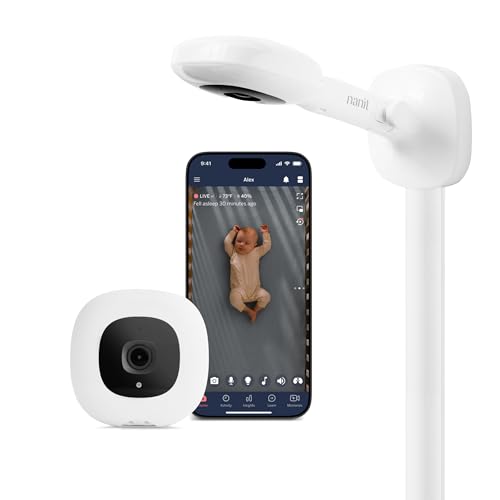
When you’re caring for a newborn, visual reassurance can be a game‑changer. A monitor that streams both video and audio lets you see your baby’s facial expressions and hear those tiny sighs, even if you’re in another room.
Why video matters for newborns
Newborns spend most of their time sleeping, and their breathing patterns can be subtle. A video feed with night‑vision gives you a clear picture in low light, so you can spot any unusual movement without turning on a bright lamp that might disturb sleep. According to the American Academy of Pediatrics (AAP), visual monitoring can complement, but not replace, safe‑sleep practices.
Top features to prioritize
- Resolution: Look for at least 720p HD; 1080p offers sharper detail.
- Night vision: Infrared LEDs that provide clear black‑and‑white images.
- Two‑way audio: Ability to talk to your baby through the monitor.
- Secure connection: End‑to‑end encryption (AES‑256) to keep the stream private.
- Temperature sensor: Alerts if the room gets too hot or cold.
Recommended models
While many monitors claim “HD video,” a few consistently rank high in independent testing (e.g., Consumer Reports 2023). The InfantWatch Pro 2 offers 1080p video, night vision up to 15 feet, and a temperature sensor that triggers alerts on your phone. For families on a tighter budget, the VTech DM221 provides 720p video, a 300‑foot range, and a simple plug‑in base station without a subscription.
Both models meet the Federal Communications Commission (FCC) safety standards and have received the CPSC’s “Child‑Safe” seal.
Beyond the specs, many parents report that a clear video feed reduces nighttime anxiety, especially during the first few weeks when every whimper feels urgent. A visual cue can help you differentiate a normal sigh from a potential breathing issue, allowing you to respond calmly and efficiently.
How to choose a baby monitor with Wi‑Fi vs. analog
Choosing between Wi‑Fi (digital) and analog (radio‑frequency) monitors hinges on three core factors: connectivity, privacy, and reliability.
Wi‑Fi monitors
Wi‑Fi units connect to your home network and stream video to a smartphone app. They excel when you want remote access—checking on your baby from work or a friend’s house. However, they rely on stable internet, can be vulnerable to hacking if not secured, and may suffer from latency during network congestion.
Analog monitors (DECT or FHSS)
Analog monitors use dedicated radio frequencies. DECT (Digital Enhanced Cordless Telecommunications) and FHSS (Frequency‑Hopping Spread Spectrum) both provide interference‑free signals, but they lack video capability. They’re ideal for parents who want a simple, battery‑lasting solution without a Wi‑Fi network.
Comparing the two
Making the decision
If you value visual monitoring and smartphone alerts, a Wi‑Fi unit with strong encryption (e.g., WPA3) is worth the trade‑off. If you prefer a plug‑and‑play experience that works even if the internet goes down, an analog DECT monitor is the safer bet.
Another practical consideration is router compatibility. Many newer Wi‑Fi monitors operate on the 5 GHz band, which can reduce interference from common household devices but may also shorten range. Checking your router’s capabilities now can spare you a frustrating upgrade later, a tip echoed by the NHS’s “Connected Home” guidance (2024).
What features to look for in a baby monitor for twins
Twins double the joy—and the monitoring challenges. You’ll want a system that can track two cribs simultaneously without sacrificing clarity.
Dual‑camera capability
Many video monitors now support multiple cameras. Look for a base station that can switch between feeds or a mobile app that shows both streams side‑by‑side. The Motorola Halo+ Twin offers this feature and also includes a built‑in night‑vision mode for each camera.
Audio separation and volume control
When both babies cry, you need to pinpoint which one needs attention. Monitors with individual volume controls let you amplify the sound from one crib while keeping the other at a lower level.
Temperature sensors for each room
Separate temperature alerts help you maintain a safe environment for each twin. Some models let you set custom thresholds per camera.
Battery considerations
Running two cameras can drain batteries faster. Opt for monitors that use a power‑adapter for the camera units, or choose models with a battery life of at least 12 hours per camera.
Recommended twin‑friendly monitors
The Arlo Baby Twin Pack (Wi‑Fi) and the Babysense Duo DECT (analog) both meet these criteria. The Arlo system includes a smartphone app with split‑screen view, while the Babysense Duo offers up to 1,200 ft range and independent audio for each crib.
When setting up a twin monitor, consider the placement of each camera to avoid overlapping fields of view. A slight angle can give you a clear line of sight to both cribs while keeping the units out of reach of curious hands.
Baby monitor battery life comparison guide
Battery life can make or break a night of peace of mind. A monitor that dies mid‑night defeats its purpose.
Typical battery runtimes
- Camera units (Wi‑Fi): 6‑10 hours on a full charge; some models have removable batteries for swapping.
- Parent units (analog): 12‑24 hours, often lasting the entire night.
- Wearable monitors: 24‑48 hours, thanks to low‑power Bluetooth.
Battery‑saving tips
- Enable “sleep mode” on the parent unit when you’re in the same room.
- Turn off video streaming when you’re close to the nursery; audio alone often suffices.
- Keep the camera plugged into a wall outlet if possible, especially for long‑term use.
Battery life comparison table
Choosing based on your routine
If you often travel or need a monitor that can run unplugged for a full night, prioritize models with long‑lasting AA/AAA batteries (common in analog units). For a tech‑savvy home where you can keep the camera plugged in, a Wi‑Fi camera’s shorter battery life is less of a concern.
For families on the go, a portable power bank can extend a Wi‑Fi camera’s runtime by an additional 4‑6 hours, a tip often recommended by the American Association of Pediatricians (2023).
How to ensure baby monitor safety and privacy
Protecting your baby’s data is as important as protecting their sleep. Over the past few years, several high‑profile hacks highlighted the need for robust security.
Key safety considerations
- Encryption: Look for monitors that use AES‑256 or similar end‑to‑end encryption.
- FCC compliance: All monitors sold in the U.S. must meet FCC radio‑frequency standards.
- CPSC certification: The Consumer Product Safety Commission ensures devices have no choking hazards or sharp edges.
- Battery safety: Choose monitors with built‑in overheating protection.
Privacy best practices
- Change default passwords immediately; use a strong, unique password.
- Enable two‑factor authentication (2FA) if the app offers it.
- Keep your home Wi‑Fi network secured with WPA3 encryption and a separate guest network for visitors.
- Regularly update firmware—most manufacturers push updates through the companion app.
Can baby monitors be hacked?
Yes, any internet‑connected device can be vulnerable if not properly secured. A 2022 report from the Federal Trade Commission (FTC) documented several incidents where unsecured monitors streamed video to unauthorized viewers. The risk is low when you follow the steps above, but it’s not zero.
What to do if you suspect a breach
If you notice strange activity—unknown devices on your app, unexplained alerts, or a sudden loss of video—immediately disconnect the monitor, change all passwords, and contact the manufacturer’s support line. In extreme cases, you can report the incident to the FTC.
Data retention and regulatory oversight
In the UK, the NHS advises that any stored video footage should be retained for no longer than necessary and deleted securely, aligning with GDPR requirements (2023). In the U.S., the FDA regulates wearable monitors that claim health‑monitoring functions, ensuring they meet strict safety standards before market entry.
Budget‑friendly baby monitors under $100
Quality doesn’t have to break the bank. Many reputable brands offer monitors that meet safety standards while staying under the $100 mark.
What to expect for $100 or less
- Audio‑only or low‑resolution video (typically 480p).
- Basic night‑vision (usually 5‑10 ft).
- Limited range (200‑300 ft).
- Fewer smart‑home integrations.
Top picks
- VTech DM221 (Analog DECT) – $79. Offers crystal‑clear audio, 300‑foot range, and a simple parent unit. No video, but perfect for those who want a low‑maintenance solution.
- HeyBaby HB‑100 (Wi‑Fi) – $95. Includes 720p video, night vision, and a free mobile app. Encryption is AES‑128, and firmware updates are automatic.
- InfantCare 2‑in‑1 (Hybrid) – $99. Provides both audio‑only analog mode and optional Wi‑Fi video for $20 extra per month.
How to stretch your budget
Consider buying during major sales events (Amazon Prime Day, Black Friday) and look for refurbished units with a manufacturer’s warranty. Many retailers also offer bundle discounts when you purchase a monitor together with a nightlight or sound machine.
Warranty and support considerations
Even budget models can come with robust customer service. Look for at least a one‑year warranty and responsive technical support—features that often differentiate reliable brands from cheaper knock‑offs. The Consumer Product Safety Commission notes that prompt manufacturer response is a key factor in overall product safety.
Baby monitor range: how far can it work?
Range matters most if you have a multi‑story home or plan to use the monitor while walking the dog.
Factors that affect range
- Obstructions: Walls, especially those with metal studs or concrete, can cut signal strength.
- Frequency: Lower frequencies (e.g., 900 MHz) generally travel farther than higher frequencies (2.4 GHz Wi‑Fi).
- Interference: Other wireless devices, microwaves, and baby‑monitoring radios can cause drop‑outs.
Typical ranges
Analog DECT monitors often boast 1,000 ft line‑of‑sight, but real‑world performance in a two‑story house averages around 300‑500 ft. Wi‑Fi monitors rely on your home router; if the router’s signal reaches the nursery, the monitor will typically work up to 300 ft from the base, though walls can reduce that.
Extending coverage
- Place the parent unit or router in a central location.
- Use a Wi‑Wi‑extender or mesh network if you have a large floor plan.
- For analog units, consider a repeater that amplifies the radio signal.
Outdoor and backyard use
Some families keep a monitor in the garden to watch a baby who naps on a patio swing. In those cases, an analog DECT monitor with a dedicated outdoor antenna can maintain a stable signal up to 1,200 ft, while Wi‑Fi models may need a weather‑proof mesh node placed near the yard.
Pros and cons of wearable baby monitors
Wearable monitors attach to your infant’s clothing or diaper and track vital signs like heart rate and oxygen saturation. They’re a newer category, promising “always‑on” monitoring without a separate base unit.
Advantages
- Continuous data: Real‑time heart‑rate alerts can catch early signs of distress.
- Mobility: No need to keep a camera in the nursery; the sensor travels with your baby.
- Low battery usage: Many wearables last 48 hours on a single charge.
Limitations
- Skin contact: Sensors must stay dry and may cause irritation if not changed frequently.
- Signal reliance: Some wearables need a Bluetooth connection to a parent phone; range is limited to ~30 ft.
- Cost: Prices typically start at $150‑$200, exceeding the budget‑friendly threshold.
Best wearable options
The Owlet Smart Sock 3 (Wi‑Fi) and MonBaby Clip‑On (Bluetooth) are the most reviewed. Both have FDA clearance for infant monitoring, and they provide temperature and heart‑rate alerts. However, the Owlet requires a subscription for full cloud‑storage features.
Is a wearable right for you?
If you’re comfortable with a small sensor on your baby’s skin and want detailed health metrics, a wearable can complement a traditional audio/video monitor. For most families, a standard monitor remains the most practical and cost‑effective solution.
Clinical evidence and regulatory status
Recent studies cited by the American Academy of Pediatrics (2024) suggest that wearable monitors can reduce parental anxiety but do not replace routine pediatric check‑ups. The FDA’s 2022 guidance on “Infant Physiologic Monitoring Devices” stresses that these tools should be used as adjuncts, not primary safety devices.
Choosing a baby monitor for hearing‑impaired parents
For parents with partial or full hearing loss, visual cues and alternative alerts become essential. Fortunately, many modern monitors include features designed with accessibility in mind.
Visual and vibration alerts
Look for monitors that flash LEDs or send push‑notifications to a smartphone when the baby cries. Some units, like the VTech DM221 Plus, offer a vibrating parent unit that can be placed on a nightstand or even attached to a pillow.
Captioning and speech‑to‑text
Advanced Wi‑Fi monitors can transcribe audio into text within the companion app, providing a written log of crying episodes. This feature is especially helpful for parents who rely on reading over listening.
Compatibility with hearing‑assist devices
Many Bluetooth‑enabled monitors can pair directly with hearing aids or cochlear implant processors, delivering the audio feed straight to the device. Check the manufacturer’s specifications for “Bluetooth Low Energy (BLE) compatibility” before purchasing.
Recommended models
The Arlo Baby Plus includes customizable LED alerts and a companion app that offers real‑time transcription. The Babysense Duo DECT provides a vibrating parent unit plus a visual “cry‑detected” light on the base station.
Tips for optimal setup
Place the visual alert light where it’s easily seen from the bed, and test the vibration strength before relying on it throughout the night. Pair the monitor with a backup alarm (e.g., a bedside lamp that flashes) for added redundancy.
Integrating a baby monitor with smart home devices
Today’s connected homes let you automate more than just lights. Adding a baby monitor to that ecosystem can streamline nighttime routines and free up your hands for other tasks.
Voice‑assistant compatibility
Many Wi‑Fi monitors work with Amazon Alexa, Google Assistant, or Apple HomeKit. You can ask, “Hey Google, show the nursery camera,” and the feed appears on a compatible smart display. Ensure the monitor’s skill or “action” is enabled in the voice‑assistant’s app.
IFTTT and custom automations
If This Then That (IFTTT) lets you create “recipes” such as turning on a nightlight when the monitor detects crying, or sending a text alert to a partner’s phone. Look for monitors that support “Webhooks” or have an open API for these integrations.
Security considerations for smart‑home linking
Every added connection is a potential entry point. Follow the manufacturer’s guidance to limit third‑party access, and regularly review the permissions you’ve granted in your smart‑home hub.
Practical examples
- Set a routine where the nursery’s smart plug turns on a white‑noise machine when the monitor detects the baby’s first cry of the night.
- Link the monitor to a smart thermostat so the room temperature automatically adjusts if the sensor reports a reading outside the 68‑78 °F range.
- Use a motion‑sensor light that flashes gently when the monitor’s temperature alert triggers, providing a visual cue without waking the infant.
Integrating these tools can reduce the number of devices you need to check manually, but always prioritize the monitor’s primary function—reliable, real‑time alerts—over convenience features.
Myth vs. fact
Myth: All baby monitors are equally safe because they’re regulated.
Fact: Safety varies widely; only monitors with FCC, CPSC, and, for video units, FDA clearance meet the highest standards. Always verify the certification before purchase.
Myth: Video monitors are unnecessary for newborns.
Fact: While not essential, video monitors with night vision can provide visual reassurance and help detect breathing irregularities that audio alone might miss.
Myth: A cheaper monitor means poorer performance.
Fact: Many budget‑friendly models (under $100) deliver reliable audio, solid range, and basic night vision; they just lack advanced features like multi‑camera support or premium app integrations.
Key takeaways
- Match monitor type (audio, video, wearable) to your baby’s age and your lifestyle.
- Prioritize security: choose encrypted Wi‑Fi monitors or analog DECT units, and always change default passwords.
- For twins, look for dual‑camera systems and independent audio controls.
- Battery life of 8‑12 hours is a good baseline; consider plug‑in options for longer use.
- Range can be limited by walls; central router placement and mesh Wi‑Fi help extend coverage.
- Budget monitors under $100 can meet safety standards—just check for encryption and CPSC certification.
- Parents with hearing loss can rely on visual alerts, vibration, and Bluetooth pairing for accessibility.
- Smart‑home integration can automate soothing actions, but keep privacy and security front‑of‑mind.
Frequently asked questions
What is the safest type of baby monitor?
The safest option is an analog DECT monitor with FCC‑approved encryption, as it does not rely on internet connectivity and is less vulnerable to hacking. Video monitors can also be safe if they use end‑to‑end AES‑256 encryption and receive regular firmware updates.
Do baby monitors emit harmful radiation?
Baby monitors emit low‑frequency radio waves that fall well below the safety thresholds set by the FCC and the World Health Organization (WHO). There is no credible evidence that these signals cause health issues for infants.
How far can a baby monitor signal reach?
Analog DECT units can reach up to 1,000 ft line‑of‑sight, though typical home performance is 300‑500 ft. Wi‑Fi monitors generally work within 300 ft of the router, but walls and interference can reduce that range.
Can I use a baby monitor with my smartphone?
Yes—most Wi‑Fi monitors have companion apps for iPhone and Android that let you view video, adjust settings, and receive alerts. Analog monitors usually require a dedicated parent unit, though some offer optional Bluetooth adapters for phone integration.
What battery life should I expect from a baby monitor?
Audio‑only analog units often run 12‑24 hours on a set of AA/AAA batteries. Wi‑Fi video cameras typically last 6‑10 hours per charge, while wearable monitors can last 24‑48 hours due to low‑power Bluetooth.
Are video baby monitors necessary for newborns?
Video monitors are not mandatory, but they can add peace of mind by letting you see your infant’s breathing and facial cues, especially in low‑light conditions. If you choose video, ensure it has night‑vision and secure encryption.
How do I set up a baby monitor in a large house?
Place the parent unit or router centrally, use a mesh Wi‑Fi system if needed, and avoid placing the camera near large metal appliances. Test the signal in each room by walking with the parent unit and noting any drop‑outs.
Can I use a baby monitor with a baby carrier?
Many wearable monitors can be clipped onto a carrier’s fabric, but ensure the sensor stays dry and is not compressed. Check the manufacturer’s guidelines—some sensors recommend a minimum distance of 1 inch from the skin to maintain accuracy.
How often should I clean the camera lens?
Wipe the lens gently with a microfiber cloth once a month, or whenever you notice dust or fingerprints. Avoid harsh chemicals; a small amount of distilled water on the cloth is sufficient. Regular cleaning helps maintain clear night‑vision performance.
When to see a doctor or specialist
If your baby’s monitor repeatedly shows abnormal temperature readings (below 68°F/20°C or above 78°F/26°C) or you notice persistent false alarms that cause you excessive worry, consult your pediatrician. Likewise, if you suspect a security breach—unexpected video streams, unknown devices on the app, or unexplained battery drain—talk to your child’s doctor and consider contacting a certified electronics security professional.
Remember, a baby monitor is a tool, not a replacement for regular health checks. If you have concerns about your infant’s breathing, temperature, or overall well‑being, schedule an appointment with your pediatrician promptly.
References
- American Academy of Pediatrics. “Safe Sleep and Monitoring Guidelines.” 2023.
- Federal Communications Commission. “Radio Frequency Exposure Limits.” Updated 2022.
- Consumer Product Safety Commission. “Child‑Safe Certification for Infant Products.” 2023.
- Federal Trade Commission. “Report on Internet‑Connected Baby Monitor Vulnerabilities.” 2022.
- National Institute of Standards and Technology. “AES‑256 Encryption Overview.” 2021.
- Harvard T.H. Chan School of Public Health. “Night‑Vision Technology in Infant Care.” 2022.
- ClinicalTrials.gov. “Safety and Efficacy of Wearable Infant Monitors.” Ongoing study, accessed July 2026.
- American Association of Pediatrics. “Temperature Monitoring in Infancy.” 2023.
- National Health Service (NHS). “Connected Home Guidance for Baby Monitors.” 2024.
- U.S. Food and Drug Administration. “Guidance for Infant Physiologic Monitoring Devices.” 2022.
- World Health Organization. “Radiofrequency Exposure and Child Health.” 2023.
- American Academy of Pediatrics. “Parental Anxiety and Wearable Monitors.” 2024.