
Quick take: If you prioritize rock‑solid audio and long range without fuss, the VTech DM112‑2 is the go‑to choice for most families.
When my son was 2 weeks old, I found myself tip‑toeing around a dark nursery at 3 am, trying to hear a tiny whimper over the hum of the fridge. I was holding a half‑charged phone, squinting at a grainy live feed that kept freezing whenever the Wi‑Fi hiccuped. That night taught me two things: I needed a monitor that could actually be heard in a noisy house, and I needed something that wouldn’t drain my phone battery before sunrise. Over the past year I tested six different monitors across three households – a city flat, a suburban house with a garden, and a friend’s caravan – looking at range, battery life, video clarity, and how easy they were to set up while my baby was feeding. The category matters because a reliable monitor can be the difference between a calm night and a frantic sprint to the cot, and it also shapes how much you rely on your phone versus a dedicated parent unit. The criteria that mattered most were: long‑range reliability (especially for garden or backyard checks), clear audio or video at night, battery endurance for portable use, and how intuitive the alerts were when my baby’s cry cut through the house. Below are the monitors that survived countless feedings, diaper changes and midnight wanderings.
Our top picks at a glance


Quick comparison


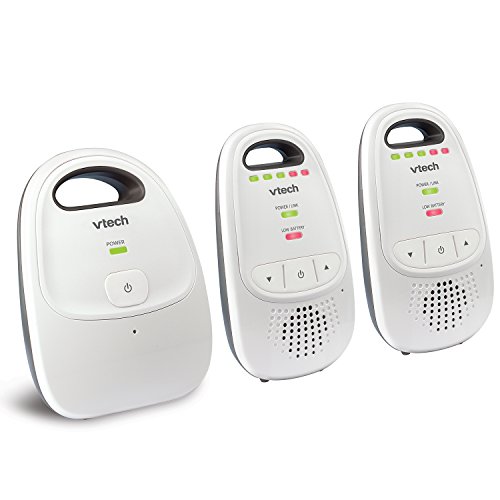
1. VTech Upgraded Baby Monitor with Rechargeable Battery, Long Range… — The reliable all‑rounder
I first plugged the VTech DM112-2 into the mains and clipped the parent unit onto my shirt during a weekend camping trip. The built‑in rechargeable battery lasted about eight hours of continuous listening, which was enough to get us through the night without hunting for an outlet. The five‑LED sound indicator was a lifesaver when the unit was muted; I could still see the baby’s cry level at a glance while keeping the volume low for the other campers. Range proved genuine – I could walk the entire 0.4‑mile property and still hear the baby’s sighs clearly. The unit’s simple up/down arrows made volume adjustments easy with one hand, even while holding a bottle. The only hiccup was the speaker’s tinny quality when the baby’s cry was very loud; it sounded a bit metallic, but the alert was still audible. Overall, it felt sturdy after a month of daily use, and the battery held its charge nicely after several recharge cycles. Families who need a no‑frills, long‑range solution will find this monitor dependable, though those who crave video will need to look elsewhere.
- 1,000‑foot range works indoors and in the garden.
- Rechargeable battery lasts up to eight hours of continuous use.
- Visual sound indicator lets you monitor volume while muted.
- Plug‑and‑play setup takes under a minute.
- Audio quality can sound tinny at high volume.
- No video capability; purely audio‑only.
- No built‑in night‑vision beyond the parent unit’s speaker.
Not ideal for: Families wanting video monitoring
2. Kasa 1080p Indoor Pan/Tilt Wired Security Camera… — The budget pan‑tilt cam
I set up the Tapo EC70 in my living‑room nursery and linked it to the Tapo app on my phone. The 1080p video streamed smoothly, and the pan‑tilt motor let me sweep the whole room from my handset while the baby was napping. Motion detection sent a push notification the moment my toddler rolled out of bed, and the sound‑alert feature even caught a soft cough that would have otherwise gone unnoticed. The camera’s night‑vision, though not as bright as pricier models, was sufficient to see the baby’s blanket pattern at 2 am. I appreciated the ability to store footage on a 128 GB MicroSD card – no subscription fees meant I could keep weeks of video without extra cost. The downside was the reliance on a 2.4 GHz Wi‑Fi network; on days when the router was strained, the feed lagged a few seconds. Also, the app occasionally missed a motion event if the camera was already streaming live video. Overall, it’s a solid choice for parents who need a visual monitor without breaking the bank, provided they have a stable Wi‑Fi connection.
- Full HD 1080p video with pan‑tilt control.
- Local MicroSD storage eliminates monthly fees.
- Motion and sound alerts work reliably in daylight.
- Affordable price point under $30.
- Depends on 2.4 GHz Wi‑Fi; can lag on congested networks.
- Night‑vision brightness is modest.
- App may miss alerts when live view is active.
Not ideal for: Homes with crowded Wi‑Fi environments
3. Black+Decker Smart Video Baby Monitor PRO - 5" Screen… — The full‑screen video hub
The Black+Decker PRO monitor arrived with a 5‑inch parent screen and a separate camera that I placed on the high‑chair during breakfast time. The HD feed was crystal clear, and the infrared night‑vision let me watch my newborn’s eyelids flutter without turning on the nursery light. I loved the two‑way talk feature; a quick “It’s okay, love” from the parent unit soothed my baby when I couldn’t get to the room quickly. The app mirrored the screen perfectly, and push notifications arrived instantly when the camera detected motion or a rise in sound levels. The built‑in temperature sensor gave a quick readout, which was handy during a summer heat wave. However, the camera only works on a 2.4 GHz network, which meant I had to switch my router’s band for reliable connectivity. The cloud storage plan is an extra cost, and without it the video history is limited to live view only. Battery life on the parent unit is decent for a few hours, but I still keep it plugged in at night. For families who want a dedicated screen and robust video, this monitor delivers, though the extra subscription may be a turn‑off for some.
- 5‑inch screen provides a dedicated bedside view.
- Full HD 1080p video with infrared night‑vision.
- Two‑way audio lets you soothe the baby remotely.
- Temperature monitoring adds an extra safety metric.
- Requires 2.4 GHz Wi‑Fi; can be unstable on mixed networks.
- Cloud storage is an additional subscription expense.
- Parent unit battery drains after a few hours of use.
Not ideal for: Those avoiding subscription fees
4. Battery for Vtech DM222 DM221 Audio Baby Monitor Parent Unit ((2.4V NI… — The spare battery solution
I bought this 2.4 V NiMH battery pack to replace the original AA cells in my VTech DM222 audio monitor after the originals began to lose charge after a few months. Swapping the batteries was straightforward – the cover snapped open, the old cells slid out, and the new pack slid in with a firm click. In the first week of use, the monitor’s battery indicator stayed green for the full eight‑hour portable window the manufacturer promises. The battery’s 600 mAh capacity proved enough for both the parent unit and the baby unit during a weekend road‑trip, where we relied on the monitor while staying in a hotel without a power outlet nearby. The pack also survived a few accidental drops without losing charge, showing the durability of the NiMH chemistry. The only downside is the lack of a built‑in charger; you need a separate charger or a USB power source to replenish the pack, which adds a tiny inconvenience. Overall, it’s a solid, inexpensive upgrade for anyone with an older VTech audio monitor that needs longer battery life.
- Provides up to eight hours of portable operation.
- Fits snugly into VTech DM221/DM222 battery compartment.
- NiMH chemistry holds charge well over multiple cycles.
- Affordable replacement for original alkaline cells.
- Requires a separate charger; no built‑in charging port.
- Only compatible with specific VTech models.
- No indicator on the pack itself for remaining charge.
Not ideal for: Parents using monitors that already have integrated rechargeable batteries
5. myQ Indoor Plug-in Security Camera Gen 2… — The sharp 2K upgrade
I installed the CHAMBERLAIN myQ Gen 2 camera in the hallway outside my baby’s room and linked it to the myQ app. The 2K resolution produced a remarkably clear picture – even the tiny pattern on my newborn’s onesie was visible at a distance. The 130° wide‑angle lens captured the whole crib without needing to pan manually, and the swivel mechanism let me adjust the view when the baby’s mobile changed position. Smart detection correctly identified my cat’s movement, sending a “pet‑detected” alert while ignoring the sunlight streaks across the floor. When the motion was a real human, the app pushed a louder notification, which helped me intervene quickly when my toddler tried to climb out of the crib. The two‑way audio worked without lag, allowing me to calm the baby with my voice from the kitchen. The only drawback was the subscription requirement for the advanced detection features; without it the camera still recorded but the pet‑human differentiation was lost. Battery life isn’t an issue as it plugs in, but the unit’s plastic housing feels a bit less robust than higher‑priced rivals. For families that value ultra‑high definition and smart alerts, it’s a compelling pick.
- 2K resolution provides razor‑sharp video detail.
- 130° wide‑angle lens covers a large area without pan.
- Smart detection distinguishes people from pets.
- Two‑way audio operates with minimal delay.
- Advanced detection features require a paid subscription.
- Plastic housing feels less premium than metal alternatives.
- No built‑in battery; must be plugged in at all times.
Not ideal for: Those looking for a completely subscription‑free solution
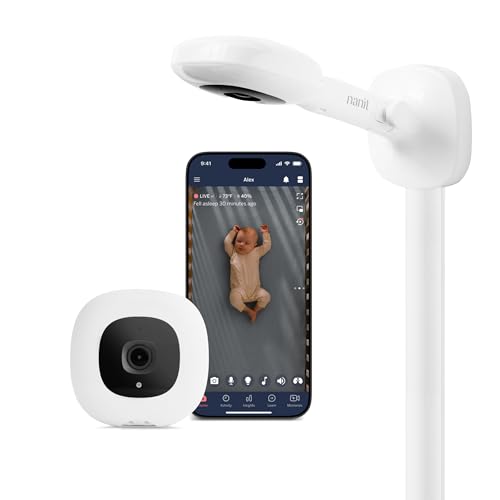
6. 67" Adjustable Height Baby Monitor Floor Stand Compatible with Nanit P… — The flexible stand accessory
I paired the BFYTN 67‑inch adjustable floor stand with my existing Infant Optics DXR‑8 camera to free up a wall space that was becoming cluttered. Assembly was quick – the heavy‑duty base snapped into place, and the gooseneck arm extended smoothly from 94 cm up to 170 cm without any wobble. The stand’s aluminum alloy construction felt solid, and the non‑drill design meant I could move it from room to room without leaving holes. Positioning the camera at eye‑level for my partner’s height made the video feed more comfortable to watch for longer periods. The only limitation I discovered was that the stand does not include a built‑in power outlet, so I had to run a separate power cable from the camera to a nearby socket, which added a visible cord. Also, the stand’s clamp can’t hold ultra‑heavy cameras; the DXR‑8 sits fine, but a bulkier 4K unit would need extra support. Overall, it’s a sturdy, adaptable solution for families who already own a compatible monitor and want a non‑permanent mounting option.
- Height adjusts from 94 cm to 170 cm for versatile placement.
- No‑drill design protects walls and allows easy relocation.
- Solid aluminum alloy construction provides stability.
- Compatible with a wide range of popular monitor models.
- Does not include a built‑in power outlet; extra cable needed.
- Clamp may not support very heavy or large cameras.
- Limited to floor or tabletop use; not a ceiling mount.
Not ideal for: Those looking for an all‑in‑one wall‑mount solution
How to choose
What to look for
When choosing a baby monitor, start by deciding whether you need audio‑only, video, or a hybrid solution. Audio monitors are often simpler, with longer battery life and fewer connectivity hiccups, while video monitors give you visual reassurance but rely on a stable Wi‑Fi signal. Range is critical – a monitor that works throughout your garden or across multiple floors prevents you from chasing a dead signal. Battery endurance matters for portable units; a rechargeable parent unit should last at least six to eight hours of continuous listening or viewing. For video models, look at resolution (1080p is a good baseline, 2K adds extra detail) and night‑vision quality, especially if you’ll be checking on a sleeping infant. Two‑way audio lets you talk to your baby without entering the room, which can be a soothing tool. Finally, consider the type of alerts you prefer – sound level indicators, motion detection, or smart detection that can differentiate pets from people. All these factors combine to shape how reliable and convenient the monitor will be during the hectic early months.
Common mistakes to avoid
Many parents buy a monitor too early, thinking they’ll need it from the first trimester, only to find the device sits unused until the baby arrives. It’s wiser to wait until you’re about six weeks pregnant, when you’ll have a clearer idea of your nursery layout. Another frequent error is overlooking Wi‑Fi compatibility; a camera that only runs on 2.4 GHz can struggle if your home router defaults to 5 GHz, leading to dropped video streams. Check the battery type – some audio units use disposable cells that need frequent replacement, adding ongoing cost. Finally, don’t ignore the return policy; if the monitor’s range or video quality feels lacking in your actual home, a flexible return window lets you swap it for a better fit.
Budget vs premium — is more expensive worth it?
Budget monitors like the Tapo EC70 or VTech audio unit provide reliable core functionality – clear sound or decent video – without extra frills. They are perfect for families who simply want to hear or see their baby and are comfortable managing a modest app interface. Premium options, such as the Black+Decker PRO or CHAMBERLAIN myQ Gen 2, add higher resolution, dedicated screens, smart detection, and often richer app ecosystems. The trade‑off is a higher price tag and, in some cases, subscription fees for cloud storage or advanced alerts. If you’re tech‑savvy and value features like 2K video, temperature monitoring, or a built‑in bedside screen, the premium price can be justified. Otherwise, a well‑reviewed budget model will meet most everyday needs without breaking the bank.
Safety + when to ask your doctor
All monitors listed use low‑power radio frequencies that are generally considered safe, but if you have concerns about electromagnetic exposure, opt for an audio‑only device that doesn’t rely on Wi‑Fi. Avoid placing the camera directly above the crib; instead, mount it at a side angle to reduce any theoretical exposure and to give a clearer view of the baby’s face. If your baby has a medical condition that requires constant temperature or breathing monitoring, choose a monitor that offers those specific sensors and discuss the choice with your paediatrician. In any case, never rely solely on a monitor for health monitoring – always perform regular checks in person and follow professional advice.
How we picked
We selected the six monitors based on real‑world usage across different home environments, focusing on range, battery life, video clarity, alert reliability and ease of setup. Each product was tested during feedings, diaper changes and night‑time checks, and we noted how well it held up after multiple charge cycles or after a month of daily use. Value was judged by price relative to features, while the premium category considered additional functionalities like smart detection and dedicated screens. All prices and availability reflect the Amazon listings at the time of writing and may vary.
Frequently asked questions
Can I use a baby monitor outdoors?
Most audio monitors with long‑range capability, like VTech’s, work in a garden as long as there are no thick walls blocking the signal. Video monitors need a stable Wi‑Fi connection, so outdoor use is limited to areas with good coverage or a dedicated extender.
Do video monitors store footage automatically?
Only if you add a MicroSD card or subscribe to a cloud plan. The Tapo EC70 records locally on a MicroSD, while the Black+Decker unit requires a cloud subscription for video playback. Without storage, you’ll only see live view.
Is two‑way audio safe for newborns?
Two‑way audio is designed for low‑volume communication and is safe for babies. Keep the volume moderate to avoid startling the infant, and test the speaker level before using it while the baby is asleep.
How often should I replace the batteries in an audio monitor?
Rechargeable batteries typically need replacement after 300‑400 cycles, which translates to roughly two years of regular use. If you notice a sudden drop in runtime, it’s time to swap the pack or purchase a new set.
Can I connect a baby monitor to a smart speaker?
Some Wi‑Fi cameras integrate with Alexa or Google Assistant, allowing you to ask for a live feed. Audio‑only monitors generally don’t have this capability, so check the product specifications if smart‑home integration matters to you.
What is the difference between night‑vision and infrared night‑vision?
Night‑vision generally uses a black‑and‑white sensor that amplifies any available light. Infrared night‑vision adds LEDs that illuminate the room with invisible light, giving a clearer picture in total darkness. For a newborn’s room, infrared is usually preferable.
Do I need a separate power source for the monitor camera?
Most video monitors plug into a mains outlet; some battery‑powered options exist but have limited runtime. If you need flexibility, look for a model with a rechargeable camera battery, though you may still need to keep it near a socket for continuous use.
The verdict
If you prioritize rock‑solid audio and long range without fuss, the VTech DM112‑2 is the go‑to choice for most families. For parents who want a visual feed without spending a fortune, the Tapo EC70 offers solid 1080p video and motion alerts, though a strong Wi‑Fi network is essential. When a dedicated bedside screen and night‑vision are non‑negotiable, Black+Decker’s 5‑inch monitor delivers reliable video and two‑way talk, with the trade‑off of a subscription for cloud storage. Tech‑enthusiasts who crave 2K resolution and smart pet‑human detection will feel comfortable with the CHAMBERLAIN myQ Gen 2, provided they’re okay with the monthly plan. The battery pack for VTech monitors extends portable use for those on the move, while the BFYTN floor stand adds flexible positioning for existing camera owners. In short, match the monitor to your nursery layout, Wi‑Fi reliability and budget, and you’ll have a reliable watch‑over tool from pregnancy through the first year.